Errata reports are for BPV use only
They provide a list of Errata items that are approved and will appear on the next Edition or Addenda
Items are sorted by Committee
Reports are filtered by record
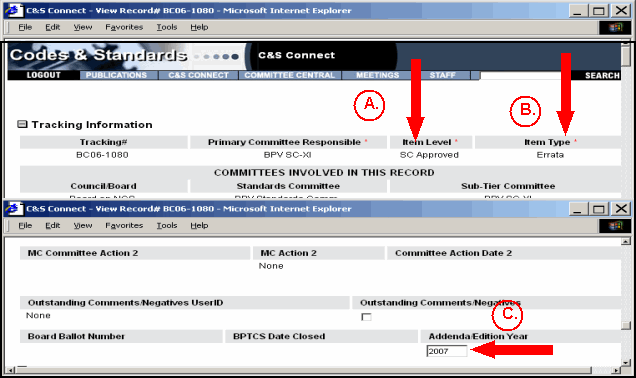
The selection criteria must be the following (entered & updated by staff):
Item Level = SC Approved
Item Type = Errata
Addenda/Edition Year field must be filled
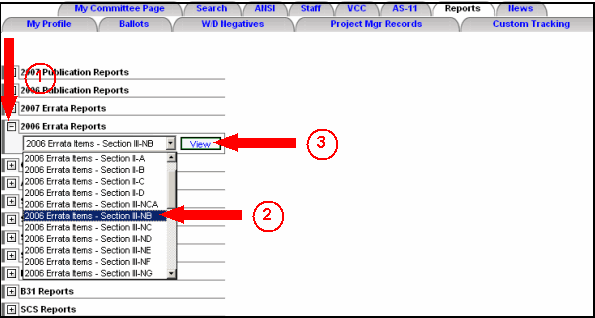
To select an Errata Report:
Click the "+" sign next to the report you wish to view
From the drop-down menu select the Code Section
Click View
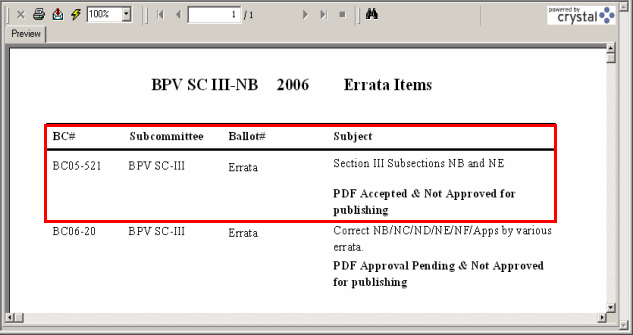
This is an example of an Errata Report for BPV SC III-NB 2006 Errata Items. This report includes the BC#, Subcommittee, Ballot # and Subject which displays the status of acceptance or approval for the submitted record: